Artificial IntelligenceCRM Software
What is CRM (Customer Relationship Management)? A Complete Guide
The Short Answer (And Why It Matters More Than Ever)
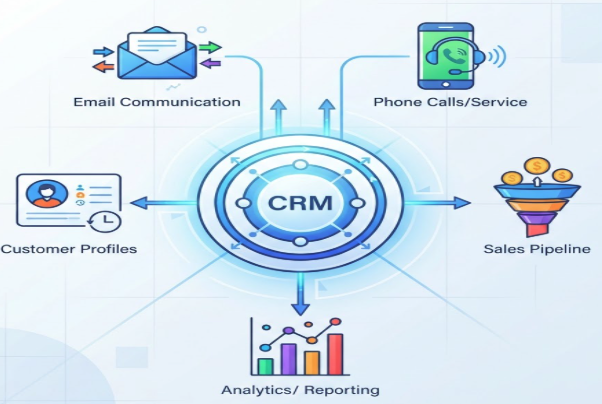
A CRM — Customer Relationship Management — is a system that helps businesses manage every interaction with their customers and prospects in one place. Think of it as the central nervous system of your sales, marketing, and customer service operations.
But here's what most definitions miss: a CRM is not just software. It's a strategy for treating relationships as your most valuable business asset — and the technology that makes that strategy scalable.
If you've ever lost a lead because no one followed up, forgotten a key detail about a client before a call, or had two teammates reach out to the same prospect on the same day, you already understand the problem a CRM solves. This guide explains what it is, how it works, and whether you actually need one.
What Does a CRM Actually Do?
At its core, a CRM does three things well:
Captures contact and company data — names, emails, job titles, deal history, notes from every call and email.
Tracks where every relationship stands — which stage of the pipeline a deal is in, when to follow up, what was promised.
Surfaces the right information at the right time — so your team never walks into a conversation blind.
Modern CRMs do much more than store data. Today's platforms automate follow-up emails, score leads by likelihood to convert, log calls automatically, and even draft personalized outreach using AI. But the foundation is always the same: a unified view of every customer relationship.
CRM vs. a Spreadsheet: Why the Comparison Matters
Most small businesses start tracking customers in a spreadsheet. It works — until it doesn't. Here's where spreadsheets break down as a CRM substitute:
Feature | Spreadsheet | CRM |
|---|---|---|
Contact history | Manual, often incomplete | Automatic, timestamped |
Team collaboration | Version conflicts, overwriting | Real-time, shared access |
Pipeline visibility | Static, requires constant updates | Live, drag-and-drop stages |
Follow-up automation | None (relies on memory) | Automated reminders and sequences |
Reporting | Manual formulas | Built-in dashboards and forecasts |
Scalability | Breaks down after ~50 contacts | Scales to millions of records |
The moment you have more than a handful of active relationships to manage, a spreadsheet becomes a liability. A CRM becomes the infrastructure.
The Three Core Types of CRM
Not all CRMs are built the same. Understanding the major categories helps you choose the right tool for your needs.
1. Operational CRM
An operational CRM focuses on automating and streamlining day-to-day business processes — sales pipelines, marketing campaigns, and customer service workflows. This is the most common type and what most people picture when they hear
the term "CRM." Examples: Salesforce, HubSpot, Pipedrive.
2. Analytical CRM
An analytical CRM digs into your customer data to uncover patterns, forecast revenue, and inform strategy. It's less about day-to-day workflows and more about answering questions like: Which customer segments are most profitable? Which deals are most likely to close this quarter? Where is the pipeline leaking?
Analytical CRMs are especially valuable for sales leaders and revenue operations teams who need to make data-driven decisions at scale.
3. Collaborative CRM
A collaborative CRM is designed to break down silos between departments — specifically sales, marketing, and customer service. The goal: every team that touches a customer has access to the same shared history, notes, and context. No more customers having to repeat themselves. No more dropped handoffs between teams.
In practice, most modern CRM platforms blend all three types. The best ones do all of it seamlessly.
Who Actually Needs a CRM?
The honest answer: almost any business that has recurring customer relationships. But let's get specific.
Businesses That Benefit Most
B2B companies with longer sales cycles and multiple stakeholders per deal
Sales teams of any size managing a pipeline of active prospects
Service businesses — agencies, consultancies, law firms — where relationship history is everything
E-commerce and D2C brands looking to personalize customer journeys and increase lifetime value
SaaS companies managing trials, onboarding, renewals, and expansion revenue
Non-profits tracking donor relationships and grant pipelines
If you're a solo freelancer with fewer than 20 active clients, you might get away with a personal CRM built in Notion — a lighter-weight approach that still gives you structure without the overhead of enterprise software.
But the moment you're managing a team, running a formal sales process, or trying to grow revenue predictably, you need a purpose-built CRM.
The Tipping Points That Signal You're Ready for a CRM
You've missed a follow-up that cost you a deal.
Two people on your team contacted the same prospect without knowing it.
You couldn't answer "How many deals do we have in the pipeline right now?" without digging through emails.
A new hire had no context on existing client relationships when they onboarded.
You have no reliable way to forecast next month's revenue.
Any one of these is a signal. All five, and a CRM isn't optional anymore — it's urgent.
Key Features to Look for in a CRM
With hundreds of CRM options on the market, it's easy to get overwhelmed by feature lists. Focus on what actually drives outcomes.
Must-Have Features
Contact and company management — A clean, searchable database of everyone you do business with, including full interaction history.
Pipeline management — Visual deal stages so you can see exactly where every opportunity stands at a glance.
Task and activity tracking — Reminders, call logs, and to-do items tied directly to contacts and deals.
Email integration — Two-way sync with Gmail or Outlook so emails are logged automatically without manual data entry.
Reporting and dashboards — At minimum: pipeline value, conversion rates by stage, and revenue forecasts.
High-Value Add-Ons to Consider
AI-powered lead scoring — Automatically prioritizes your hottest prospects based on behavior and fit.
Automation workflows — Trigger follow-up emails, task assignments, or stage changes based on predefined rules.
Native integrations — Direct connections to your email, calendar, marketing tools, and billing software.
Mobile access — Critical for field sales teams or anyone managing relationships on the go.
Reputation management — Newer CRM platforms are beginning to include review monitoring and response tools, which matter enormously for local and service businesses.
CRM in Practice: What a Day in the Life Looks Like
Abstract features only mean so much. Here's a concrete example of how a CRM changes daily work for a five-person B2B sales team.
8:00 AM: A sales rep opens their CRM dashboard and sees three tasks flagged for today — two follow-up calls and one proposal to send. All three were automatically created from previous conversations logged in the system.
9:30 AM: Before a discovery call, the rep pulls up the contact record. They can see every email exchanged, the notes from last week's call, the company's industry and size, and the fact that the prospect visited the pricing page twice yesterday. That context shapes the entire conversation.
11:00 AM: After the call, the rep updates the deal stage from "Discovery" to "Proposal Sent" with two clicks. An automated workflow fires off an internal Slack notification to the sales manager and schedules a follow-up reminder for 72 hours later.
3:00 PM: The sales manager runs a pipeline report. She can see the total value of deals by stage, the average time deals spend in each stage, and which reps have the most at-risk deals sitting idle. She makes two coaching decisions based on real data — not gut feel.
This is what a unified view of customer relationships enables. Not just data storage — operational clarity across the entire team.
Expert Take: The CRM Mistake Most Companies Make
Here's an insight you won't find in most CRM explainers: most CRM failures are not technology failures — they're adoption failures.
A CRM is only as good as the data that goes into it. And data only goes in when the people using the system find it genuinely useful, not just another administrative burden layered on top of their real work.
The companies that get the most out of their CRM share one trait: they built the system around how their team actually works, not the other way around. They started simple — contact records, pipeline stages, basic follow-up tasks — and added complexity only when the team had built the habit of using what was already there.
The companies that fail tend to implement the most expensive platform available, migrate every piece of historical data on day one, configure 40 custom fields, and then wonder why their reps are logging into the CRM three times a week instead of three times a day.
The lesson: pick a CRM your team will actually use. Nail the basics before you layer on automation and AI. A simple system used consistently beats a sophisticated system ignored.
Wondering how current CRM platforms are evolving? The next generation of tools is moving toward agent-driven automation — check out our breakdown of which CRM you should use in 2026 and 2027 as AI agents become a core part of the stack.
Industry-Specific CRM Use Cases (The Gaps Most Guides Ignore)
Most CRM content focuses on SaaS and tech sales. But CRM value extends well beyond Silicon Valley.
Professional Services (Law, Consulting, Accounting)
For professional services firms, the CRM is primarily a relationship intelligence tool. It tracks not just deals but the depth and recency of partner-level relationships, referral sources, and matter history. The key metric isn't "pipeline value" — it's relationship health over time.
Manufacturing and Distribution
CRM for manufacturers focuses on long account cycles, distributor relationships, and reorder triggers. Integration with ERP systems is often critical, and the CRM functions more as an account management platform than a traditional sales pipeline tool.
Healthcare and Wellness
Patient relationship management requires CRM-like functionality with strict HIPAA compliance overlays. The "pipeline" is typically a patient journey from inquiry to treatment to retention, and the follow-up sequences are appointment reminders and care check-ins rather than sales outreach.
Non-Tech Small Businesses
For local service businesses — plumbers, landscapers, real estate agents — a CRM is often combined with scheduling, invoicing, and review management. The relationship data that matters is job history, referral source, and whether the customer left a Google review.
How 1stContact.ai Brings It All Together
Understanding what a CRM does is step one. Finding one that actually fits your business without requiring a six-month implementation and a dedicated admin is step two.
1stContact.ai is built for exactly this gap. It combines a full CRM — contact management, pipeline tracking, deal stages, activity logging — with AI automation, marketing funnels, and reputation management in a single platform designed for small and mid-sized businesses that want enterprise-grade capability without enterprise complexity.
Here's what that means in practice:
Unified contact and deal management — every interaction, note, and follow-up in one place, accessible to your whole team.
AI-powered automation — follow-up sequences, lead nurturing, and task creation that run without manual intervention.
Pipeline visibility — drag-and-drop deal stages with real-time reporting so you always know where revenue stands.
Reputation management built in — monitor and respond to reviews directly from the platform, without switching tools.
Marketing funnels and campaigns — nurture leads from first touch to closed deal without stitching together five separate tools.
If you're in the early stages of choosing a CRM, it's worth reading the complete CRM guide before committing to a platform — and if you're evaluating enterprise options, our breakdown of whether Dynamics 365 qualifies as a true CRM is a useful reference point for understanding what "full CRM" actually means.
Conclusion: The CRM Is Not a Tool — It's a Competitive Advantage
At its simplest, a CRM keeps you organized. At its best, it fundamentally changes how your business grows — by making every customer relationship visible, every follow-up timely, and every decision data-driven instead of instinct-driven.
The businesses winning in competitive markets are not necessarily the ones with the biggest budgets or the largest teams. They're the ones that show up more prepared, follow up more consistently, and treat customer relationships as a strategic asset rather than a byproduct of day-to-day operations.
A CRM is the infrastructure that makes all of that possible. And the best time to build that infrastructure is before you feel the pain of not having it — not after.
Ready to see what a modern, all-in-one CRM looks like in practice? Explore 1stContact.ai and see how it brings your contacts, pipeline, automation, and reputation management together in a single platform built for businesses that are serious about growth.
1stContact.ai answers calls and texts 24/7, books appointments, and keeps every lead in one pipeline. $197/mo, unlimited users and contacts.
View plans